December 10, 2025
Build a Throwaway Prototype First: How I Use Vibe Coding to Avoid Tech Debt
Why I build a throwaway prototype in Lovable before creating the real product. A rapid iteration process that reveals what NOT to build, mitigates tech debt, and lets you explore fast without committing to bad architecture.
TL;DR
Diving into Lovable without a plan turned my first build into an unusable mess. The fix: build throwaway prototypes first. I now spend a few hours creating high-level versions to explore layouts, flows, and components before starting production. When ready to build for real, I use Lovable's chat to summarize what I learned, then refine that into a foundation prompt with ChatGPT. The result is a cleaner starting point and fewer side effects.
The Problem with Building First
As a technical product manager, my role was to be an orchestrator. Most of my work involved setting others up for success in executing their tasks. Whether it was to work with designers to define a flow, developers to identify the table structure that wouldn’t put us into a corner later when we enhanced functionality, QA to help determine if something was a feature or a bug, customer success to make sure they had all their info and artifacts to roll out the release, or to provide stakeholders with a roadmap update. The job, while very rewarding, sometimes lacks the joy of taking something from start to finish and crossing it off the to-do list.
So when I finally tried Lovable.dev for the first time, I dove in headfirst without any planning and started building right away. I was like a kid in a candy store. I had a lot of fun and was building fast, but I wasn’t building anything stable. The constant switching things up and deciding on different approaches led to way too many unintended changes. When I tried to change something on one page, it would cause side effects on another page.
While I was building faster than I thought possible, I was also creating tech debt at an impressive rate. It was clear that the tools were remarkable, but if I didn’t put intention into my building process, the tech debt would blow up my product.
The Throwaway Prototype Approach
If you go into the pre-build stage with the understanding that you will throw things out, you can get the most value out of this step: identifying the high-level flows you want to build, what patterns you want to follow, where can you re-use functionality across your software, how you want to lay out the pages, and where you see future scaling issues. The power of vibe coding is that you can iterate and test out concepts and ideas rapidly, and then build cleanly and on a stable foundation when you are ready.
You can have multiple throwaway projects, too. Don't feel bad if you say, "I want to explore concept X on its own." The goal here is not perfection but iteration, so you can identify and build a foundation that sets up your product for where you want to take it. If you chase perfection, you will overarchitect your project and get nowhere. This process is a short exercise of a day or two at most, and in most cases, just a few hours.
I vibe-coded a few pre-build throwaway projects after my first attempt became too unwieldy. All the data was hardcoded, the buttons just automatically took you to the next step, but the flow was there. These prototypes revealed more insights into the user experience, allowing me to provide the product with greater intention.
What the Prototype Reveals
With a product called AssMan.ai, I needed to make it immediately apparent that it was related to the Football Manager game series. The origins of the name can be found here. I also needed to make the call to action apparent to the user so that, without thinking, they know what to do. This flow was one of the outliers where I spent days tinkering in the pre-build stage, rather than the usual handful of hours.
You can see one of my early smoke-and-mirror prototypes for the flow here. If you go through the flow on the actual website today, you will notice many of the same core components of the overall flow. There is an upload section that transitions to a spinner page while the analysis is running. The analysis page displays the feedback and provides an interactive chatbot at the bottom. Eventually, I landed on the following, which was heavily influenced by the pre-build prototypes.
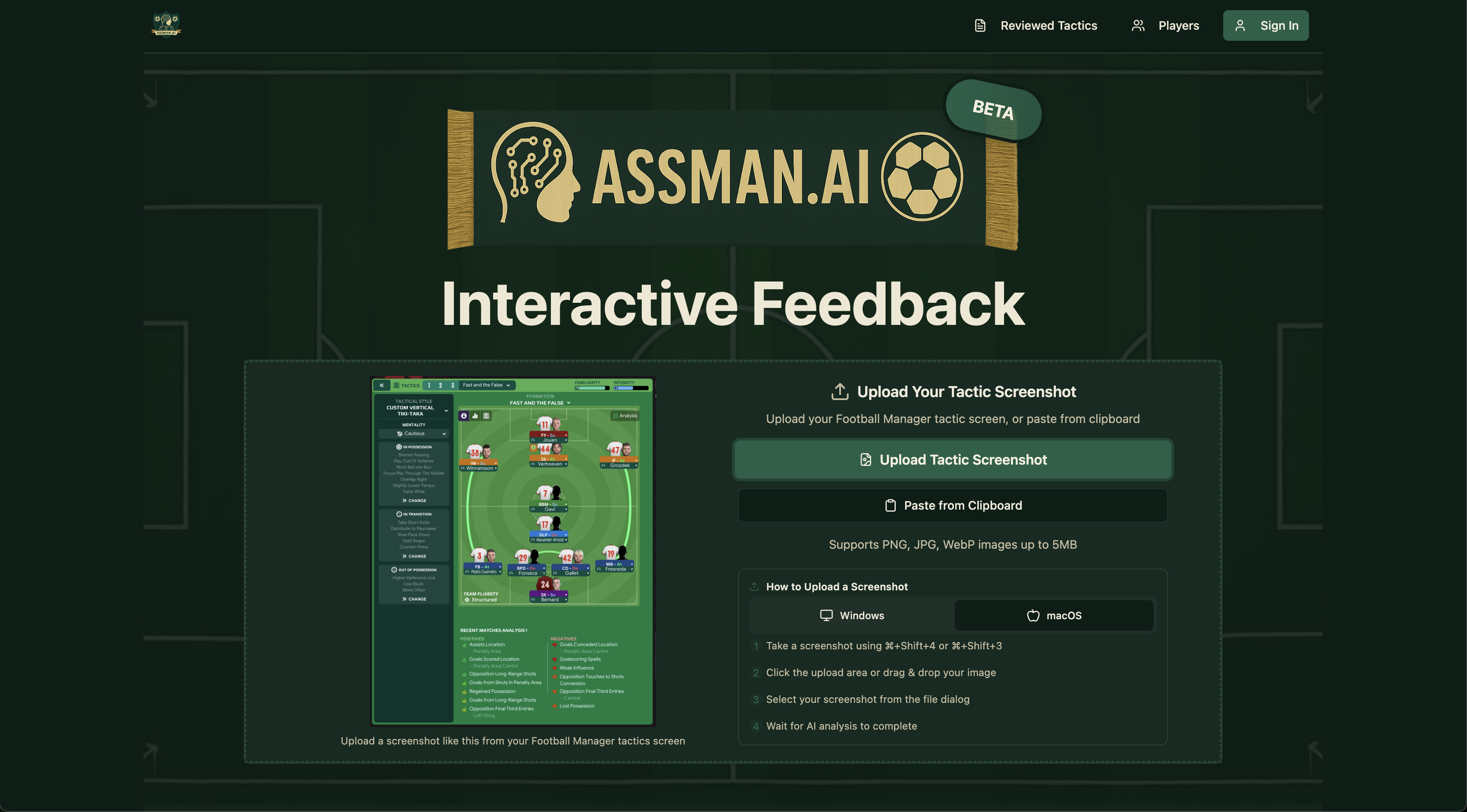
Starting at the top of the page. I have my logo, a traditional soccer scarf with the product name, and a soccer ball to give users instant visual cues that it is soccer-related. Complete transparency, I put a beta tag there to buy some leniency from users if the experience isn’t perfect. Below that, I have the subtitle "Interactive Feedback," which instantly shows users the value of using this tool, as discussed in my article on product validation for Assman.ai.
Inside the box, there are three main aspects: a pulsing green button that makes a clear, identifiable call to action on what the user needs to do. An example tactic image so users know exactly what to capture in their screenshot. Finally, there is information on how to take a screenshot to reduce friction further if the user doesn’t already know.
You can see the influence of testing this flow out on different operating systems and screenshot methods. Depending on the user’s operating system, the section defaults to their OS. There are many methods for capturing a screenshot; some save and download the file, while others only copy to the clipboard. Because of that, I made the primary CTA "Upload Tactic Screenshot,” as I expected that to be the core flow, and I also included “Paste from Clipboard” below it to not limit users.
The user can see all this information and take action all without any scrolling. That was very important to me to keep when I optimized the flow for mobile.
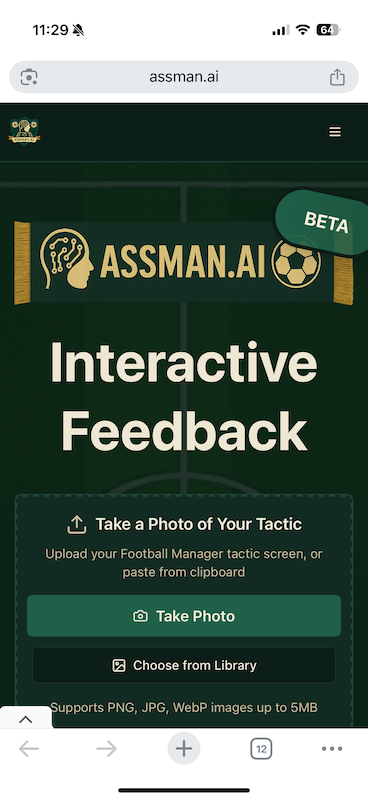
On mobile, you will notice two significant differences. First, the button changes from “Upload Tactic Screenshot” to “Take Photo”. This intentional change allows a mobile user to either instantly take a photo or, if they already have one, use the “Choose from Library” button below, which replaced “Paste from Clipboard”. I went back and forth a bit on whether it made sense to do this, since I basically moved the upload and save photo functions to different locations based on mobile or desktop. Still, I made the intentional decision to do this, as I would expect most users would not have a photo of their tactics on their phones, given the player base's overwhelming skew toward PCs.
The tactic feedback was something I worked on outside of Lovable. I used ChatGPT Playground, a tool that lets you test and compare different AI models and settings exactly as they would behave via the API. I used the tool to iterate until I found an output that would populate the frontend. You can see an example of the latest version here.
At this point, it was time for me to start my real production product, so I asked Lovable’s chat feature for an overview of where we stood on each of my prototypes. I then entered that data into ChatGPT. From there, I iterated until I found a prompt that would help lay a stable foundation.
I had my general layout defined: pages, functionality, common components, and core flow. The prototype gave me a blueprint. I wasn't guessing anymore. I knew what to scope, what to skip, and how to structure the product.
Closing Thoughts
Build a throwaway prototype first. Spend a few hours exploring how you really want the product to work so you don't spend days or weeks correcting an assumption. Limit iterations to hours, and stretch only to multiple days when necessary.
The barrier to building keeps getting lower. What took a lot of effort three months ago is easier now, and that gap will keep shrinking.
Related Posts
How I Built an AI Product With Lovable.dev (No Code): Full Breakdown, Costs, and Insights
Breaking down how I built my first AI product using Lovable.dev, including architecture, costs, decisions, analytics, and early lessons.
November 25, 2025
How to Validate Product Ideas Using Reddit and ChatGPT Before Building
How I used Reddit and ChatGPT to validate product features before building with no-code tools, including research process, actual data, and prioritization decisions non-technical founders can replicate.
December 6, 2025
How I Built an AI Tactic Analyzer Using Lovable, Supabase, and OpenAI
A step-by-step breakdown of building AssMan.ai’s AI tactic analyzer using Lovable, Supabase, and OpenAI. Covers prompt design, backend schema decisions, API integration, validation, and cost control for non-technical founders.
December 22, 2025
More Like This
Get new articles on validation, product decisions, and building with AI tools.